Easier relation property setup
Relation properties make your databases even more powerful, helping you build workflows — like knowing which tasks are associated with certain projects.
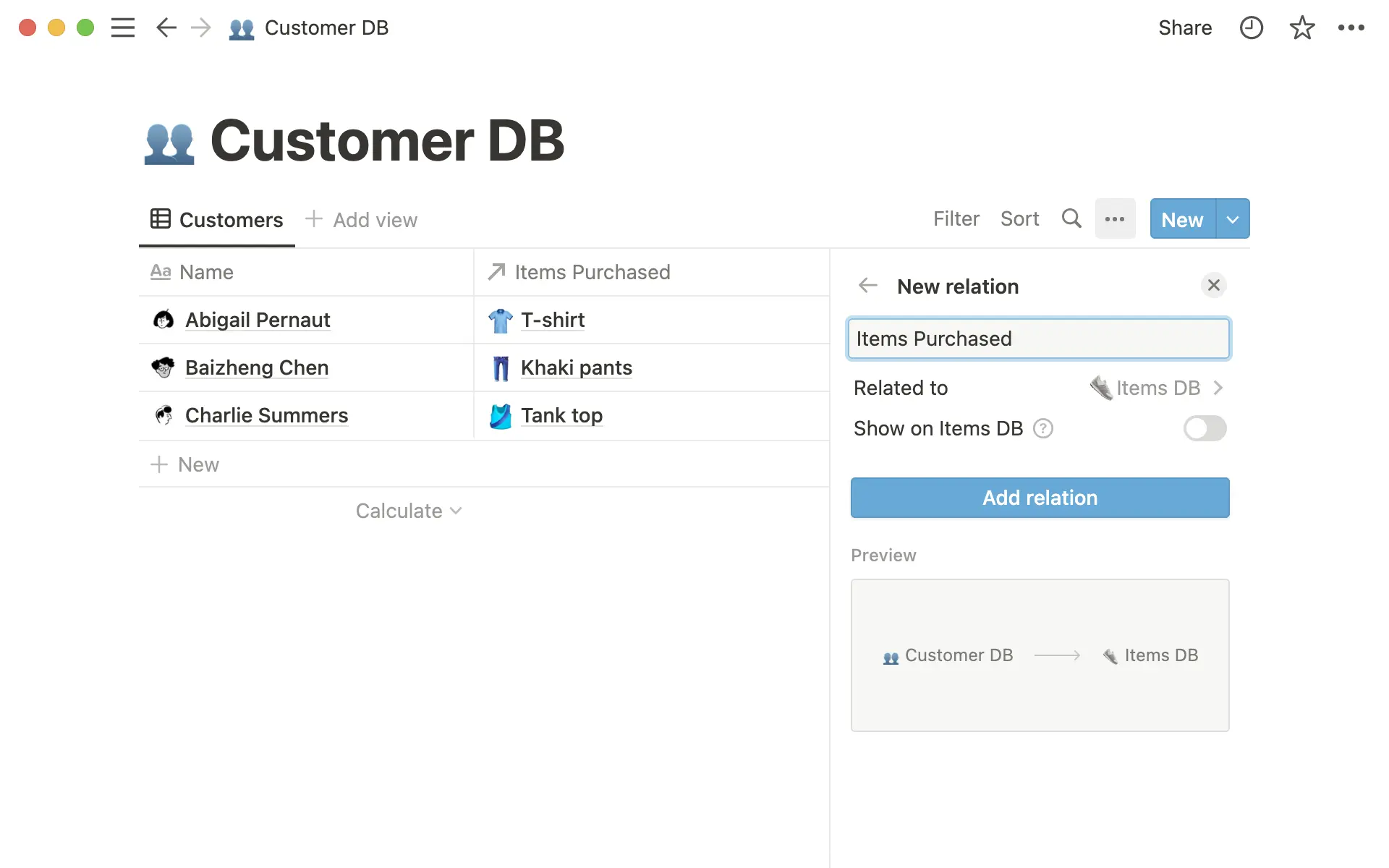
Before, adding a relation always created two properties: one on each database. But you don’t always need the extra property. Now, you have the choice:
One property (default): Add items from Database B to Database A, without creating another property on Database B. Backlinks are added to the related pages on Database B to make navigation easy, without adding clutter.
Two properties (optional): After you add a relation, click the “Show on the other database” toggle to create another property on Database B, so you can see a list of related pages displayed on both databases.
Whether you’re creating a new relation or editing an existing one, it’s much easier to configure and visualize your relations to perfectly fit your workflow.
Bug fixes & improvements
For new API features & improvements, go to developers.notion.com/changelog →
When you use the “Move to” function, a new pop-up appears at the bottom of your screen with options to undo, or visit the page that you moved the item to
Fixed a bug that prevented some users from being able to scroll in the “Settings & members” menu
Fixed a bug that caused some typing lag for some users when using the
Return/EnterandDeletekeys on large pagesFixed a bug that caused database templates to be displayed as options when adding a relation property